

Play Osmo
October 11, 2015
Maybe it’s because I’ve been a lifelong ‘geek’ or maybe because my Dad, a lifelong ‘geek’ himself, always encouraged my love of STEM from a young age (at least of the S&T portions). Regardless, I’ve made it a bit of an obsession to ensure that my daughter, now 6, gets a healthy dose of all things Science, Technology, Engineering, and Math from a young age.
Turns out I’m not the only STEM-obsessed dad. Not by a long shot. There are whole communities of us out there — Moms too — constantly looking for the latest and most interesting ways to get kids engaged. A recent conversation with Candice Faktor about Kano reminded me that I’ve got a go to list of STEM-related purchases that other STEMy parents quickly scribble down and run off to buy.
This is the first post in a series about the STEM inspiring toys, games, books, and apps that we’ve tried at home. Most of them are great and get repeat use, a few have ended up collecting dust on shelves. Osmo is on of our favorites and regularly makes an appearance, so let’s start there.
Osmo
Starter kit: $99.95. If you can, I’d spend the extra $30 for the Genius kit ($129.95), which includes more of the special hardware add-ons for the games below. Buy directly from http://playosmo.com.
Osmo and the gravity-defying Newton app
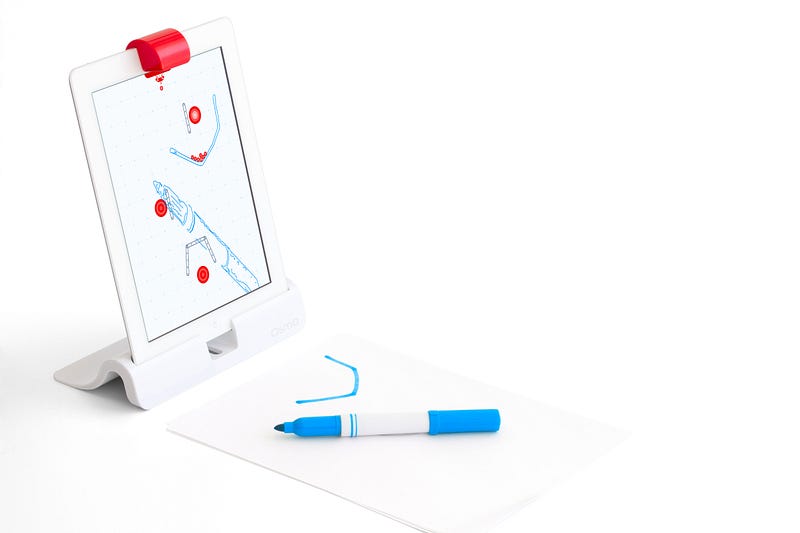
Osmo is a very clever iPad add-on from some former Googlers. The little red cap pops over the iPad’s camera and the base, which adapts to various sizes of iPads, holds it at the perfect angle. Load up one of the free apps from the App Store and interact with Osmo by drawing in front of it (as in the image above) or using tiles and shapes from their different app kits.

Numbers
The newest Osmo app. Drop numbered or domino-dotted tiles to pop bubbles and liberate the fish.

Masterpiece
All about drawing. Start with one of their included photos, a photo from your camera roll, or a new photo that you shoot in app. Draw on a piece of paper in front of the iPad and see what you’re drawing overlaid on the image. Since it’s just a piece of paper and any drawing tool, this game doesn’t require any special add-on hardware like tiles or pieces. It’s very similar to the technique used by Tim Jenison in the excellent doc Tim’s Vermeer:
Tim’s Vermeer trailer
Newton
The game shown in the photo above, Newton involves drawing shapes like ramps and jumps to get the balls falling from the top of the screen to the target. Like Masterpiece, Newton doesn’t require any special add-on hardware.

Words
Similar to numbers, Words involves throwing down letter tiles to spell the name of the thing pictured on screen. You can play red vs. blue for head to head action.
Tangram
Finally, Tangram is the classic wooden block game with a few modern twists. Early levels are relatively easy, but it gets a lot harder when you only see the shape’s silhouette with no hint as to which piece goes where.
We’re really looking forward to seeing what else they come up with, which is a big part of why we like this one so much. The original Kickstarter set was Tangram, Words, and Newton, and they’ve since released Masterpiece and Numbers. Hopefully the rate of new releases continues!
Subscribe to JayGoldman.com
Get occasional email updates when I write new posts or have things to share. Unsubscribe anytime.