

An ode to the Starbucks app
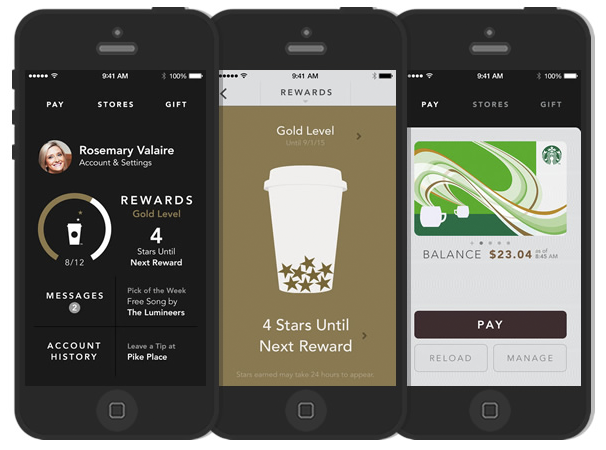
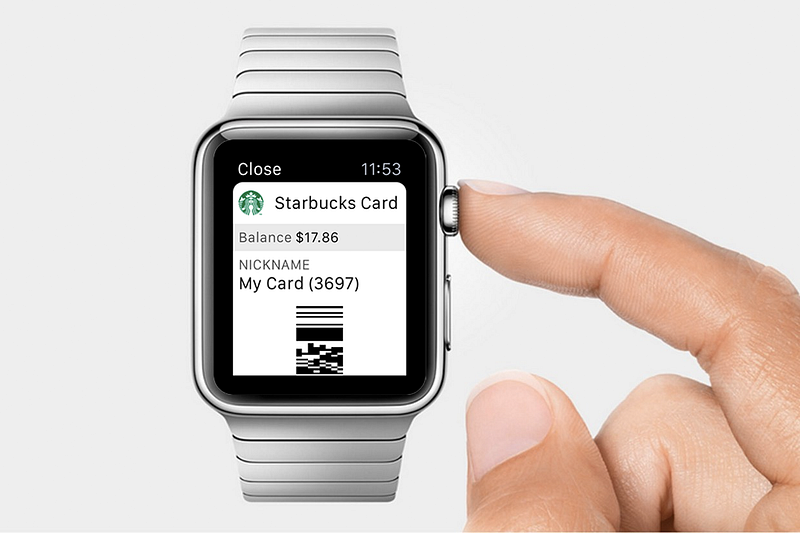
I’ve been a fan of the Starbucks app since it launched, immediately ditching any plastic cards in favor of keeping them all in my phone (and now on my watch). The convenience is much appreciated since I always have my phone with me and never have to worry about whether I remembered my cards or having them take up space in my wallet. Win.
While everyone else was coming up with complex hardware to pay with your phone at point of sale (aka POS, which also means something else that often aptly describes that experience), Starbucks just solved it with an onscreen barcode. Actually, not Starbucks. A guy named Benjamin Vigier and his team. Benjamin’s name is, of course, familiar to you because you remember the news breaking back in August 2010 that he had been hired by Apple to head up their payments division. Excellent memory! And now we have Apple Pay as a direct result (well, you probably do at any rate — not yet available in Canada).
I’m not the only person who likes the Starbucks app. It was so successful after its 2009 pilot launch to 16 stores that it quickly spread nationwide. How’s it done since then you ask?
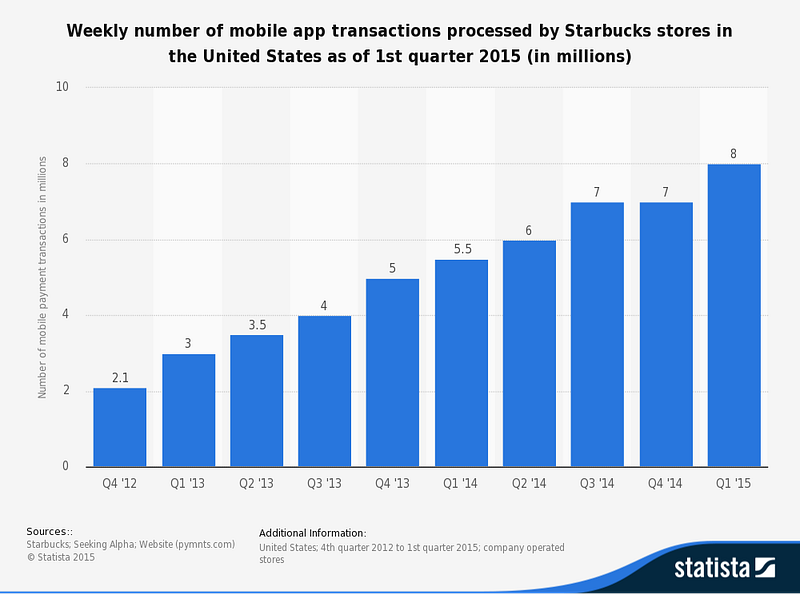
Starbucks app sees about 8 million weekly transactions as of Q1 2015
Back in 2014, Business Insider said that the app was on track to process over $1.5 billion in payment volume in the U.S. in 2014. In the second quarter it accounted for 15% of the transactions in U.S. company-operated stores. Not too shabby.
Their brilliantly simple innovation, which you’ve probably seen or used yourself by now, was to display a 2D barcode on your phone’s screen and have the cashier scan it. Here’s what it looked like originally:
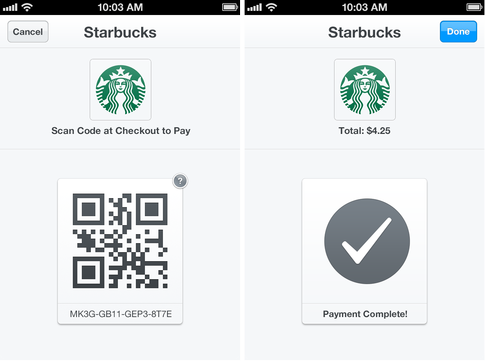
Never mind trying to get wireless swipe cards speaking to readers or weird Bluetooth bracelets or NFC incantations. Just show a barcode on your screen that matches your card ID, have the POS check that your balance, then push a notification to your phone to reflect the new total. Magic, in the Arthur C. Clarke sense. Of course, now it looks like this:
The Starbucks app isn’t just a payment method. Every Starbucks card is a loyalty card, rewarding a star for each purchase. An unnecessarily visual representation of your stars landing in a trademark Starbucks cup is part of the app, showing you how close you are to a free drink:
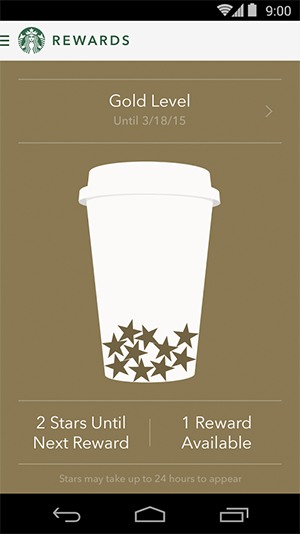
You also get a free drink on your birthday, which is a nice touch.
The one thing I never liked about the app: you can’t tip. I used to drop the change from my coffee into the tip jar, especially at my local Starbucks, but now I don’t actually pay with cash so there’s nothing to drop. It took away a small sign of appreciation between me and the people who quite literally keep me alive most days. Starbucks addressed that in March 2014, launching the ability to “digitally tip” your barista within a window of each purchase.
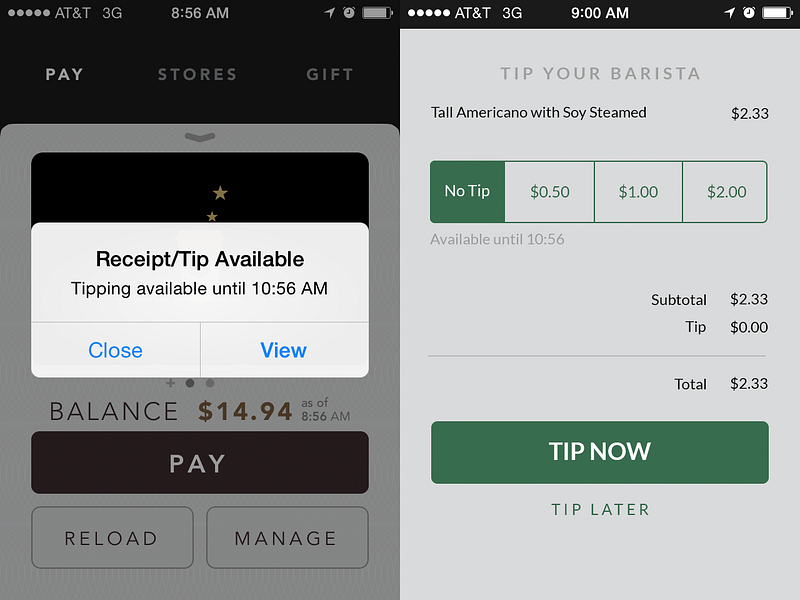
Problem solved! I suppose we have to take it on faith that the tips actually end up in the pockets of the people for whom they’re intended. Assuming they do, it’s as elegant a solution as the original barcode scanners.
Mobile Order & Pay
I could have ended this story here and it would have been a nice, neat story about a clever hack to accelerate mobile payments that’s proven to be wildly successful. But then Starbucks launched Mobile Order & Pay and proved, yet again, that they are absolutely leading the mobile retail space (although, perhaps, not their mastery of marketing friendly program names).
Here’s how it works in three easy steps:
- Install the Starbucks app on your phone. Available for iOS or Android. Make sure that you have Location Services enabled and turned on for the app.
- Register a Starbucks account or login to your existing one.
- Open the app and look for a MENU tab at the top of the screen. Tapping on that should then show you an interstitial screen about the new ORDER feature, then a terms of service, and then a screen to place your first order.
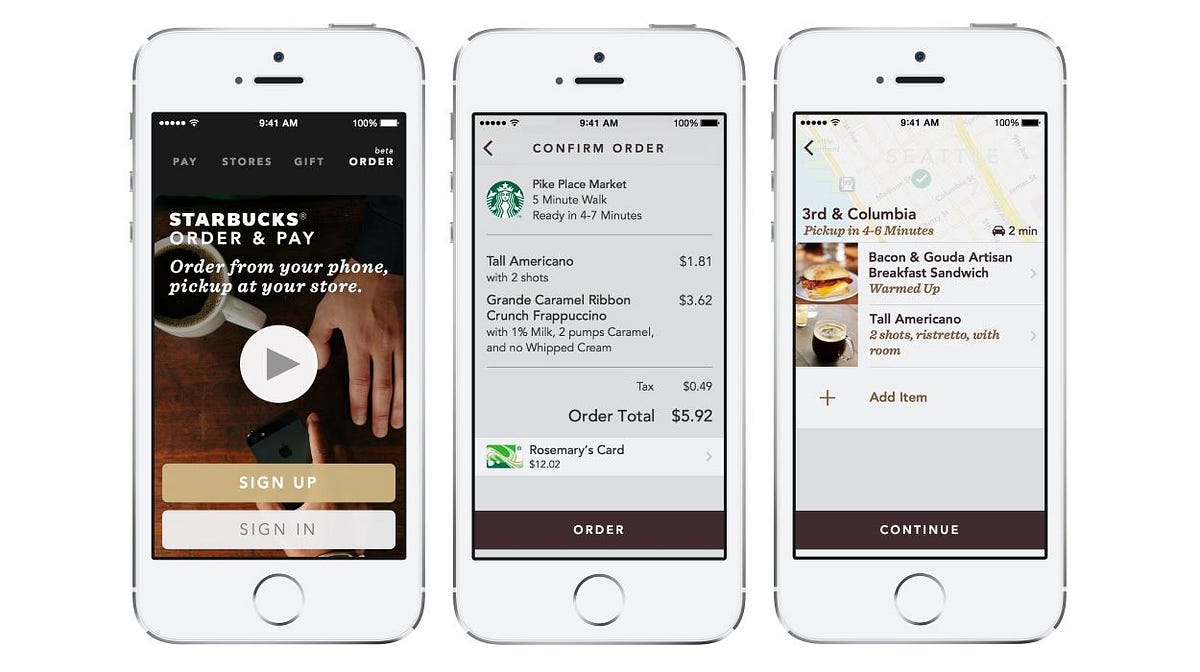
When you place the order at a specific store, a printer by the cash spits out a sticky label for your cup with your name and order on it. Your cup joins the line of cups from in-store orders, making its way along the coffee assembly line until it reaches the bar. A second printer there spits out your receipt and the barista calls out your name so you can grab your cup. Easy peasy.
Much like the original barcode ‘hack’, this system’s genius lies in the fact that it seamlessly overlays the existing Starbucks ordering, making, and delivering system. No need to really train people on a new process (although I’m sure there was training involved), so much as to insert mobile orders into the already heavily optimized Starbucks assembly line.
Long term impact
The immediate reward is awesome, especially if your local Starbucks is packed at peak times like ours is. We ordered coffee whilst upstairs in our office today and then sauntered down and grabbed it right off the counter like a bunch of bosses. But what does this mean in the long term?
- With a significant portion of their business now coming through the app, and Mobile Order & Pay being deployed to all those customers, how long before Starbucks stores start being redesigned to optimize the end of the line for pickups and minimize the front for orders?
- What happens to all the impulse purchases people buy while standing in front of the coolers and counters today?
- At what point do the majority of customers order in advance and then pickup without ever really interacting with a barista? I’m reminded of an episode of the excellent Noonmark podcast in which they talk about the depressing reality of a burrito joint in San Francisco, filled with a lineup of people who have been paid by other people through apps to pickup their food.
- Coming downstairs to pickup the coffee felt like the next potential optimization. How long before I put my order in and it just shows up? UberEATS has this figured out for food, though I still have to walk out to the car to get it. If I’m going to really get my 21st century, app-enabled, geolocated, sharing economy powered lifestyle on, I need to sit on the couch and have all this stuff just come to me.
Subscribe to JayGoldman.com
Get an email when I publish. Pick a stream — or everything. Unsubscribe anytime.